Secure credentials
Tokens live inside OpenCart and are renewed without manual intervention.



CSL Wolt Connector brings secure API connectivity, product sync, stock rules, and multi-venue visibility together so you do not have to rely on manual exports.
Tokens live inside OpenCart and are renewed without manual intervention.
Decide what gets sent, how pricing behaves, and how stock is mapped to Wolt.
Logs, manual sync runs, and store lists keep the rollout observable day to day.
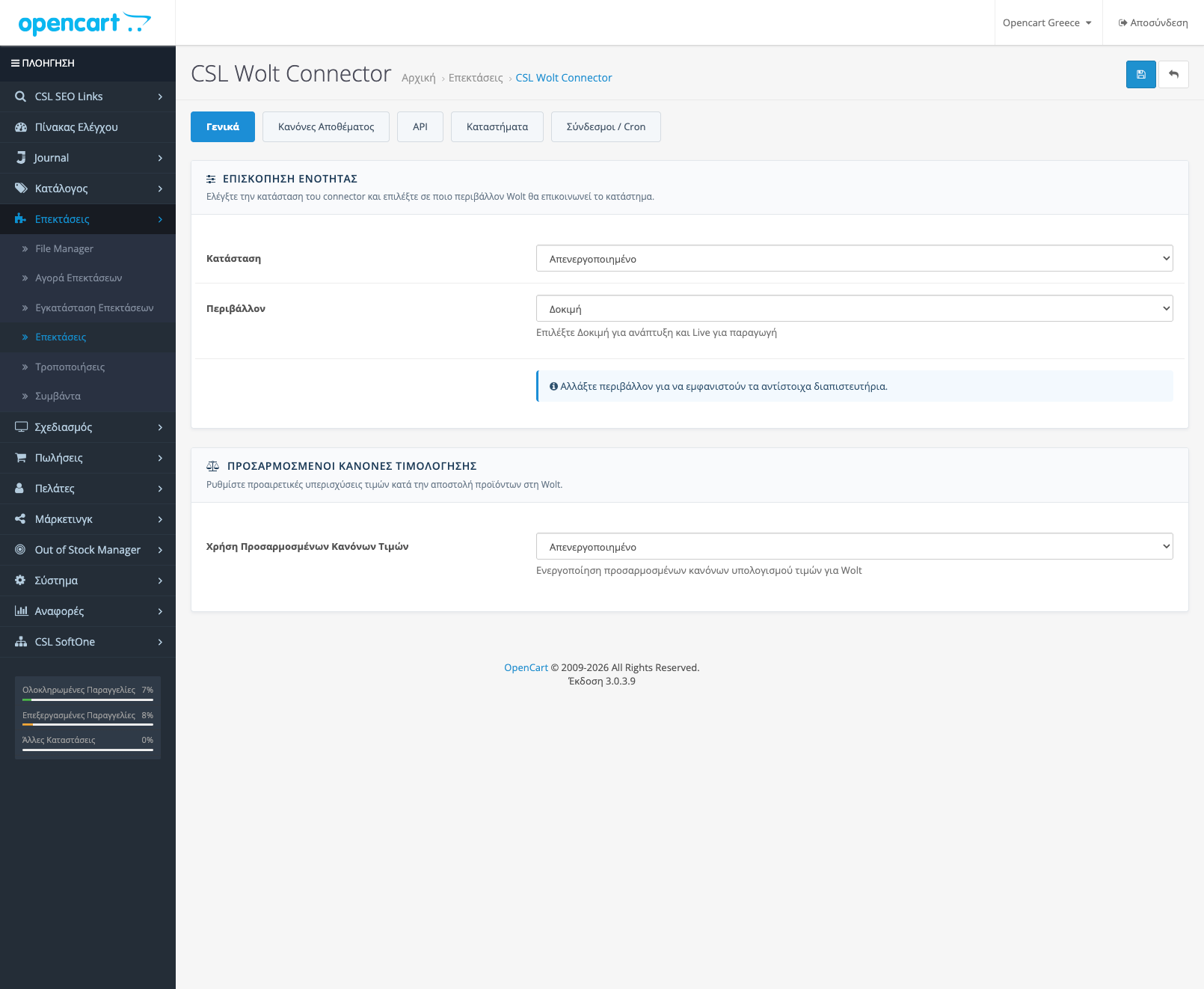
Enable the connector, choose the right environment, and review the main settings from one place.
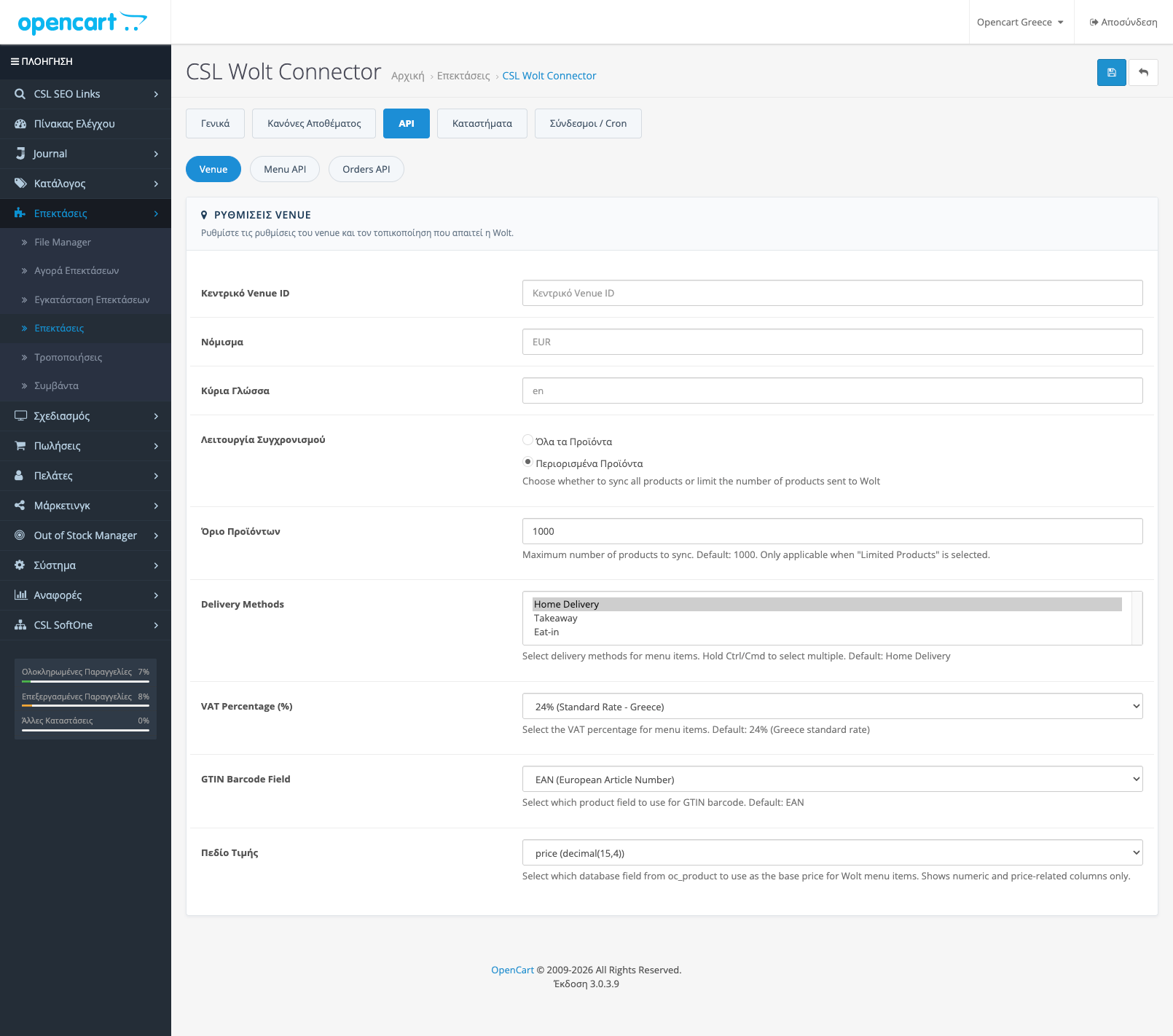
Define venue, VAT, delivery methods, and the source price field from the API tab.
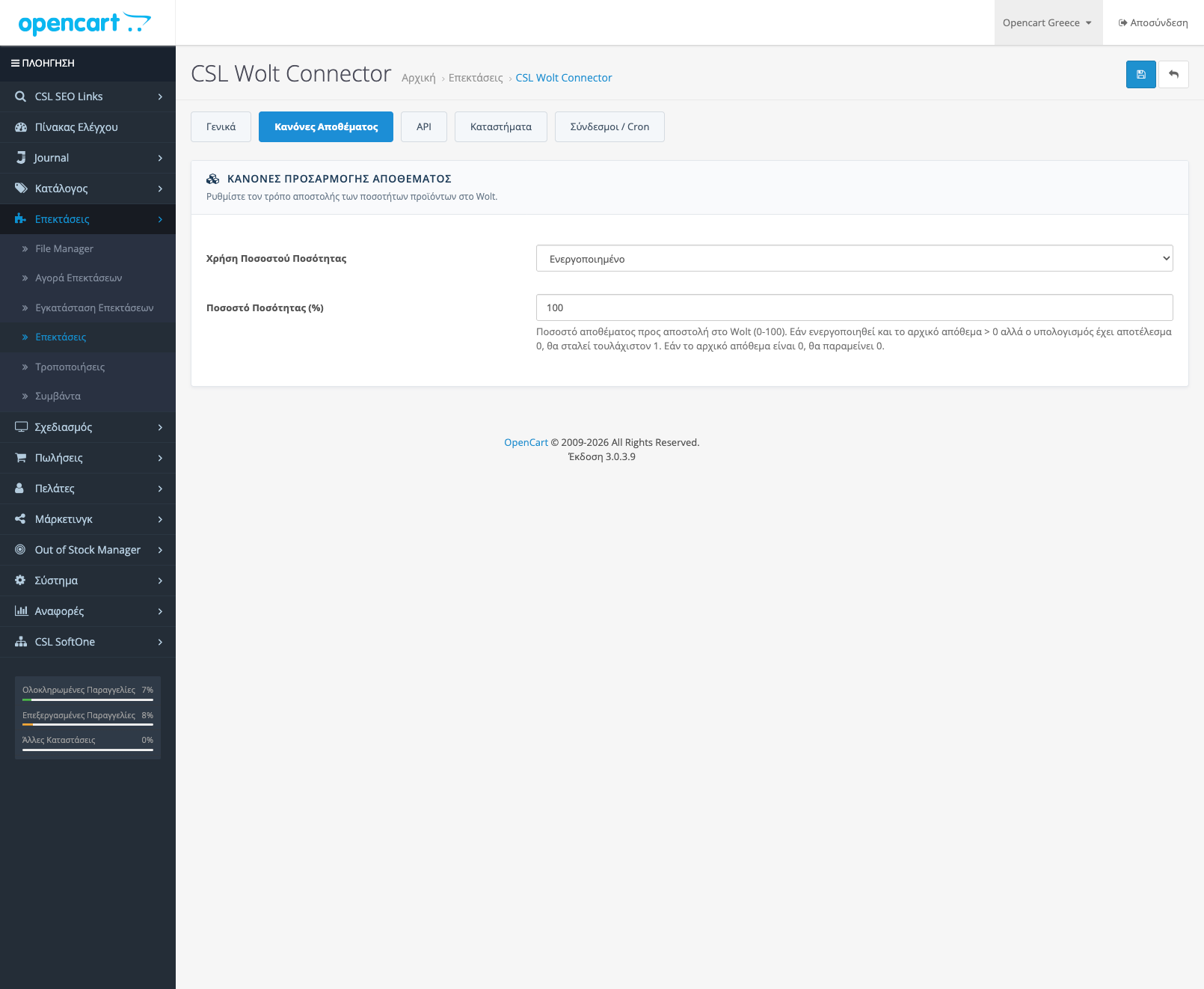
Control the quantity percentage that gets sent to Wolt and shape availability more carefully.
Instead of generic claims, the page now shows how the plugin works inside the admin and where it saves time during daily operations.
The connector is built for stores that want to connect OpenCart to Wolt without rebuilding catalog logic, stock handling, and manual exports every time the menu changes.
The plugin separates setup, API control, stock rules, and store management so the sync flow remains predictable.
It relies on the official Wolt API, stores credentials safely, and handles token renewal.
You can limit the volume of products, control stock percentages, and filter how the catalog is sent.
The stores tab keeps Wolt venues visible so you can organize multiple selling points from one OpenCart backend.
The flow does not stop at a simple connection. You still need to decide scope, stock logic, and venue-level behavior.
Choose the test or live Wolt environment and supply the required credentials.
Select all products or a limited catalog together with VAT, delivery methods, and field mapping.
Tune quantity percentages and pricing rules so the Wolt menu follows your commercial strategy.
Watch store status, trigger manual syncs when needed, and keep each step visible.
The settings that directly affect Wolt menu data are not scattered across the admin.
After setup, the real value is understanding what runs and where to intervene when something changes.
The plugin does not stop at a flat export. It can apply category-level logic so Wolt prices follow a different commercial strategy than the core storefront.
Pricing rules are applied before other pricing logic, which helps when specific categories need a permanent uplift.
This is useful when you want to absorb marketplace costs or protect margin on categories with different behavior.
This example shows how you can keep a separate Wolt margin strategy without breaking the base OpenCart pricing structure.
After initial setup, the value of the connector depends on how quickly you can spot problems and rerun the sync without ambiguity.
You are not forced to rely only on automation: manual and scheduled actions stay separate, and manual sync runs let you validate changes immediately.
Keep a detailed view of each sync so failed operations or bad mappings can be identified quickly.
See available Wolt stores centrally and keep the multistore environment organized.
Set the interval and batch size for scheduled full refreshes, with coalescing so duplicate runs are not created.
Track every store and category of the active cycle, with a completion estimate and the full progress view.
Detects changes made directly in the database, feeds them into the sync queues, and shows the check status (current, delayed, error).
Today the plugin covers catalog, stock, and admin control surfaces, while more advanced flows can be added around your requirements.
For businesses that need deeper integration, the connector can be extended toward the order flow as well.
There is room for a broader control surface around whether a venue is online and when it can accept orders.
If your business model needs a more specialized flow, we can scope the custom work and the rollout plan with you.
CSL Wolt Connector targets Greek OpenCart stores that need reliable marketplace sync now while keeping a clean path for custom improvements later.
The screenshots show where the main settings live: status, stock rules, API fields, and the store list.
Concise answers around scope, setup, and extensibility.
The plugin covers API connectivity, catalog data, pricing, stock, and the main admin settings needed to send your products correctly to Wolt.
Not necessarily. The interface is designed for management from the OpenCart admin, while our team can also handle installation and the initial mapping if you want a safer setup.
Yes. Percentage-based category adjustments are supported so you can keep a separate marketplace pricing strategy.
Store management is built in so you can review venue information from the admin and organize multistore setups from one place.
The order flow can be implemented as a custom extension on request and is the clearest next step when deeper integration is needed.
The license applies to one OpenCart store. It includes updates and support for one year, with renewal available afterward.
The scheduler runs account-wide full refreshes with a configurable interval and batch size, while manual triggers coalesce so duplicate runs are not created.
Yes. The full progress view shows every store and category with live updates and a completion estimate.
The external bridge check scans products, feeds those changes into the Items and Inventory queues, and reports status (scanning, current, delayed, error) with the number of checked products.
Whether you need a ready connector for catalog, stock, and pricing rules or you want a custom order flow in the next phase, we can help from installation through production rollout.