Web server
- Apache 2.4+ or Nginx 1.18+
- mod_rewrite enabled



Install OpenCart in the right order: confirm requirements, upload the correct files, finish the browser installer, and harden the store right after the first login.
The OpenCart package has a specific layout. A quick visual check before upload helps you avoid wrong-folder uploads and partial file transfers.
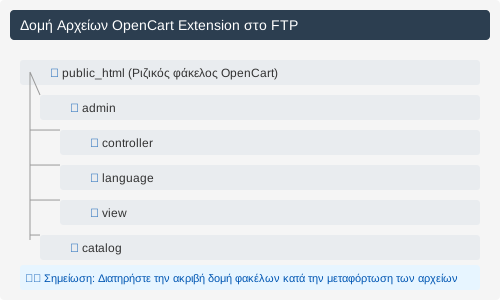
Before the installer opens, confirm that your hosting and stack cover the core OpenCart requirements and that no required PHP extension is missing.
Preparation stays simple when you keep the order intact: download the official package, extract it locally, then upload the files carefully into the correct server directory.
If the structure looks right before upload, the installer will start without unnecessary file hunting.
Download OpenCartDownload the latest version of OpenCart from the official site
Download OpenCartUncompress OpenCart files on your computer
Upload the files to your web server via FTP/SFTP
The install process needs three clean steps: correct permissions, a fresh database, and a complete browser installer pass with all credentials ready.
Apply the required permissions before you run the installer so it can write cache, logs, and the core config files.
Create a new MySQL base and keep the following elements:
If these details are ready before the installer opens, the setup finishes without jumping back into the hosting panel.
The browser installer walks through the license, system check, database details, and admin account in one continuous flow.
If the flow stops on the system check, go back to PHP extensions and permissions first instead of pushing ahead to the next steps.
Do not leave the guide the moment the admin opens. Final hardening is what turns a successful install into a safe production baseline.
Delete the installer folder as soon as setup completes so the installation endpoint is not left exposed.
install/ Return the config files to safer permissions so they are not left writable without a reason.
644 Confirm login, core settings, and media paths are working normally before you move on to deeper configuration work.
If hosting, permissions, or the first setup are slowing you down, we can handle the installation and a basic review so the store starts from a clean baseline instead of a rushed workaround.