Funnel coverage
Tracks browse, cart, checkout, and purchase actions with a clean GA4 event model.



GA4 Tracking for OpenCart
Connect your OpenCart store to dependable GA4 eCommerce tracking, admin diagnostics, and a Test Center that lets you validate critical events before real data is missed.
Tracks browse, cart, checkout, and purchase actions with a clean GA4 event model.
Review KPIs, top products, and recent events directly inside the OpenCart admin.
Run diagnostics, payload previews, and replay tests without extra tooling.
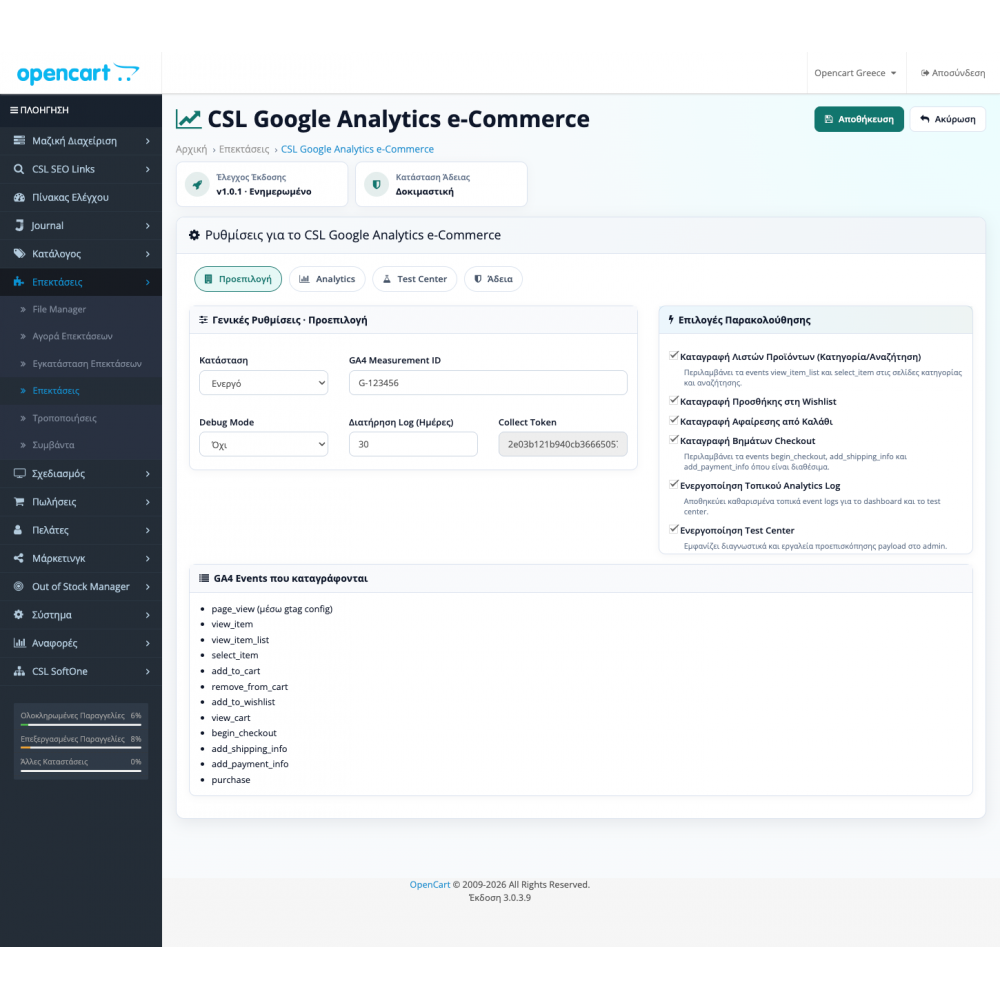
Settings, analytics, validation
Three control surfaces, one workflow
The plugin brings setup, monitoring, and testing into one coherent admin experience.
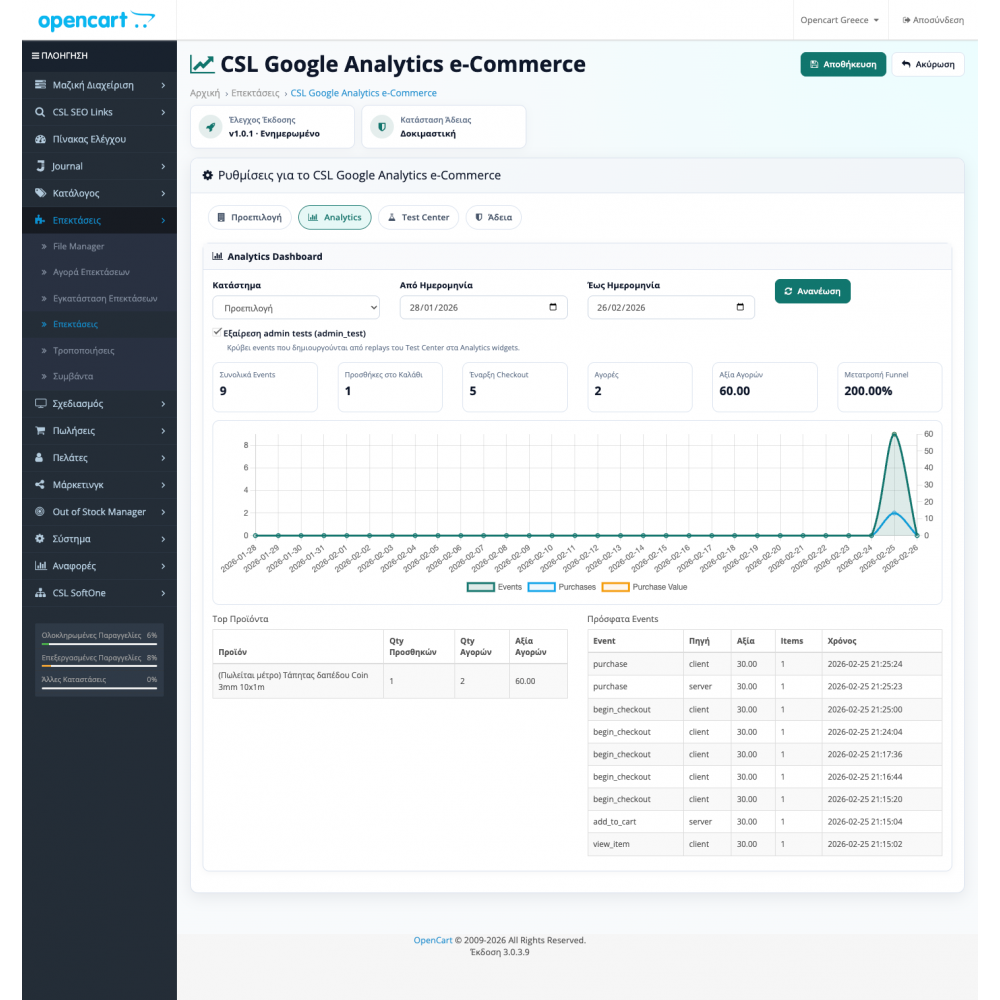
Analytics Dashboard
Aggregated metrics, funnel signals, and recent events per store.
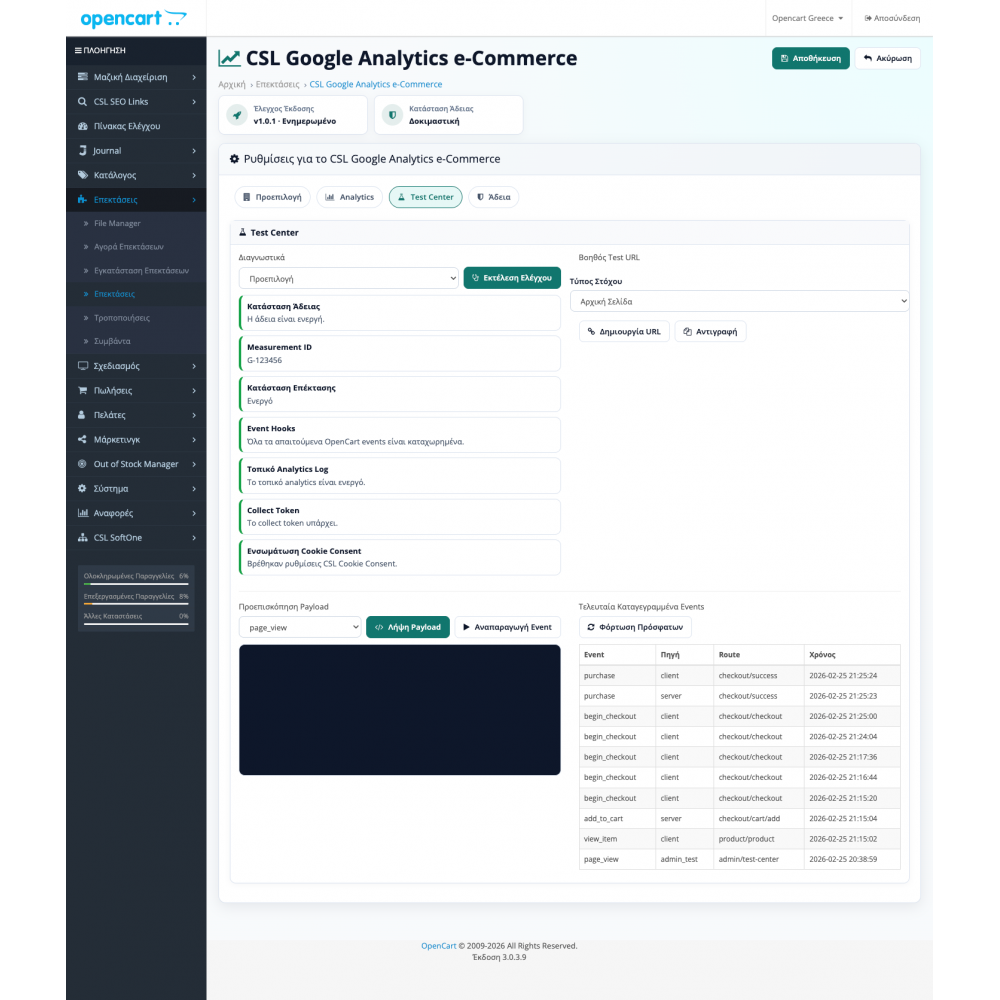
Test Center
Measurement ID diagnostics, payload previews, and replay-based validation.
Built for stores that need clean measurement
This page is not relying on generic claims. It shows how the plugin structures setup, monitoring, and testing inside the OpenCart admin.
CSL Google Analytics eCommerce Tracking is built for stores that need stable GA4 funnel tracking without ad hoc code changes every time the checkout flow changes.
It combines measurement setup, consent-aware dispatch, dashboard reporting, and Test Center tooling so event validation happens quickly from one place.
Separate Measurement IDs and tracking toggles for each store.
Tracking logic adapts to analytics consent and store-level cookie behavior.
Optional local analytics log for reporting and payload validation inside the admin.
From setup to validation
Instead of stopping at a settings page, the plugin splits the job into three clear steps: configure, observe, and actively test.
Define Measurement ID, consent behavior, event toggles, and local logging per store.
The dashboard consolidates KPIs, conversion signals, time-series data, and recent events.
The Test Center provides diagnostics, payload previews, helper URLs, and replay tests for focused validation.
GA4 event coverage
The event names are exposed as they are implemented in the plugin, so it is clear what fires at each funnel stage.
Tracks key browsing signals and interaction with lists and product pages.
page_view view_item view_item_list select_item Captures additions, removals, and intent signals before checkout begins.
add_to_cart remove_from_cart add_to_wishlist view_cart Covers shipping, payment, and final purchase milestones.
begin_checkout add_shipping_info add_payment_info purchase This event coverage can be verified through both the dashboard and the Test Center, which is especially useful when testing checkout behavior and custom flows.
Data handling
When local analytics logging is enabled, storage behavior stays explicit across retention, sanitization, and per-store isolation.
Sensitive personal fields such as email, phone, address, IP, and user agent are excluded before storage.
Choose the cleanup policy that matches your reporting and validation cadence.
Data stays separated so multistore setups remain clear to audit and validate.
Compatibility and extensibility
The plugin targets stores that need production-ready coverage now, while still needing a clear path for special checkout logic when custom flows exist.
Simple commercial model
Start with a free trial to confirm the events are captured correctly in your own store, then move to the one-time license when you are ready.
The cost is determined by your requirements and the scope of the requested enhancement work.
GA4 validation
GA4 tracking in OpenCart has to measure the full path from view_item and add_to_cart through begin_checkout, add_shipping_info, add_payment_info, and purchase. If an event is missing or sends the wrong value, currency, or items, marketing decisions rely on incomplete data.
Before the plugin is treated as ready, we check consent behavior, multistore Measurement IDs, checkout variations, purchase duplication, and Test Center records.
Products, cart, checkout, and purchase are sent in the correct order.
Values, currency, item IDs, and quantities match the OpenCart order.
The Test Center shows what was sent before you search through the GA4 interface.
Operational questions
The core questions that usually influence the buying decision and installation planning.
The installation is done like the classic OpenCart extensions, and basic guidance is included for correct configuration of GA4 Measurement ID.
Yes. The core GA4 shopping journey events are covered, from product and list views through cart, checkout, shipping, payment, and purchase.
The trial is free for 3 days so you can confirm in your own store that the GA4 events are being sent correctly.
It includes single plugin purchase and free updates forever.
Yes, custom development and enhancements are made based on requirements and related quotes.
Real admin screens
These screenshots show the plugin in practical use: settings, dashboard, and Test Center.
Ready to test
Start with the 3-day trial or move to the full license if you need stable tracking, dashboard validation, and lifetime updates.