Per-store settings
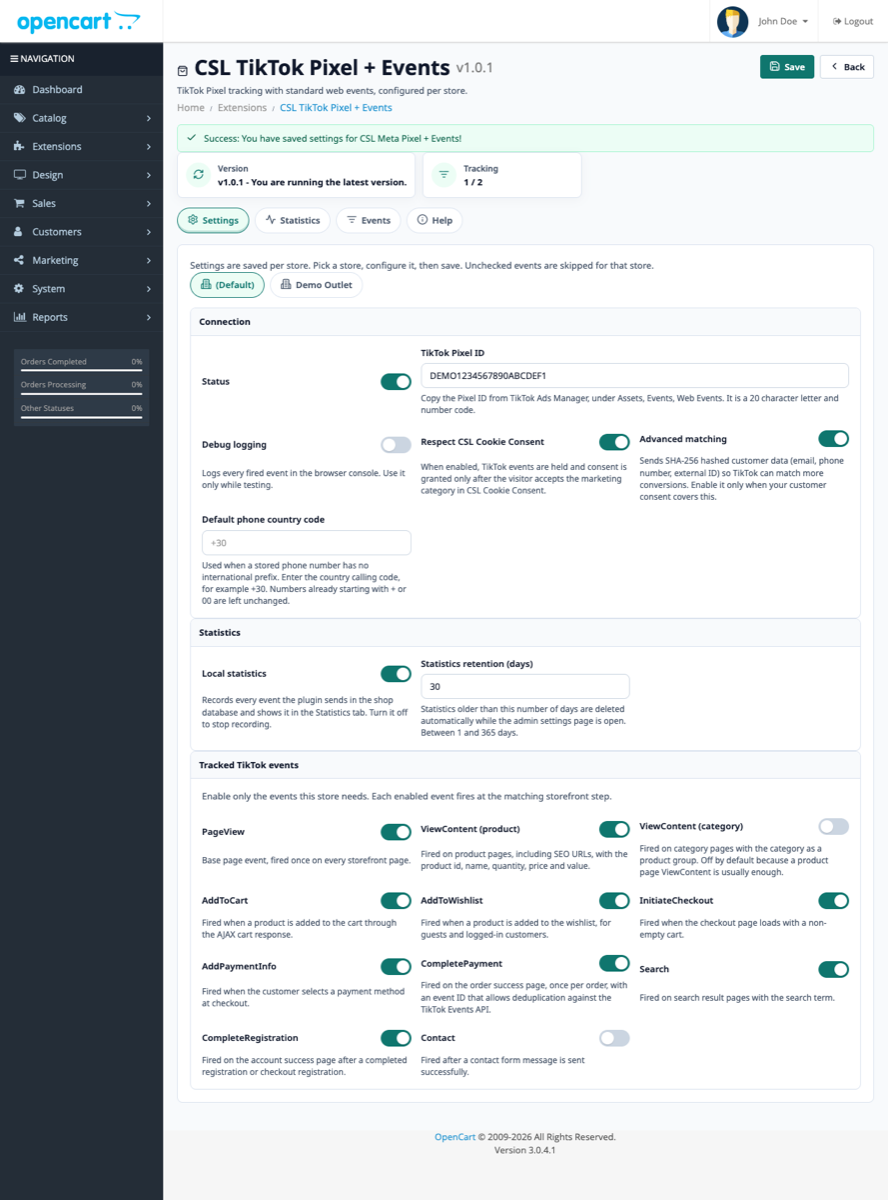
TikTok Pixel ID and event toggles per store, with a Greek and English admin.



TIKTOK PIXEL FOR OPENCART 2.3 AND 3
CSL TikTok Pixel records core storefront events from ViewContent to CompletePayment, with per-store settings and consent mode. Try it for 3 days or buy the full version for €39.99.
WHAT IT RECORDS
The plugin adds the TikTok Pixel to every page and sends the events you enable: PageView, product ViewContent, Search, AddToCart, AddToWishlist, InitiateCheckout, AddPaymentInfo, CompletePayment, CompleteRegistration and Contact. Category ViewContent is optional and off by default.
CompletePayment fires once per order and session with an event_id for TikTok Events API deduplication. It represents checkout completion, not confirmation that a payment provider has settled the funds.
EVENTS
Every event has its own switch per store. The notes show where each event fires.
PageView Once on every storefront page. ViewContent (product) On product pages, with id, name, quantity, price and value. ViewContent (category) Optional, with the category as a product group; off by default. AddToCart From the AJAX cart response. AddToWishlist For guests and signed-in customers. InitiateCheckout When checkout opens with a non-empty cart. AddPaymentInfo When the customer selects a payment method. CompletePayment Once per order, with an event_id for deduplication. Search On search results, with the search term. CompleteRegistration After account registration or checkout registration. Contact After a contact form is sent successfully. SETTINGS
Everything is configured from OpenCart admin, with separate values for each store.
TikTok Pixel ID and event toggles per store, with a Greek and English admin.
The TikTok consent API holds events before load and grants or revokes consent with CSL Cookie Consent. If the module is absent, the option stays hidden.
SHA-256 hashed email, phone and external ID. A default phone country code fills numbers without an international prefix.
KPIs, daily chart, top products and recent events, with 7/30/90-day filters and 1–365 day retention.
COMPATIBILITY
One package covers OpenCart 2.3.x and 3.x. The Pixel ID is the 20-character code from TikTok Ads Manager > Assets > Events > Web Events.
SCREENSHOTS
Real screens from settings, events and local statistics.
FAQ
PageView, product ViewContent, Search, AddToCart, AddToWishlist, InitiateCheckout, AddPaymentInfo, CompletePayment, CompleteRegistration and Contact. Category ViewContent is optional and off by default.
CompletePayment fires once per order and session and carries an event_id for TikTok Events API deduplication. Refreshing the success page does not create another event.
Yes, from one package without OCMOD. OpenCart 2.3 uses the legacy event model and mirrors the store status into the extension setting.
Yes. The Pixel ID and event toggles are saved per store.
The TikTok consent API holds events before load and grants or revokes consent with CSL Cookie Consent. After revocation, event scripts are blocked.
SHA-256 hashed email, phone and external ID. The default phone country code is used when a number has no international prefix.
The events emitted by the extension, with KPIs, a chart, top products and recent events. They do not confirm receipt by TikTok or attribute sales to campaigns.
In TikTok Ads Manager > Assets > Events > Web Events. It is a 20-character code of letters and numbers.
It logs every event in the browser console for testing. Enable it temporarily and turn it off afterwards.
It is available as a 3-day trial or full version for €39.99 from the OpenCart Greece e-shop.
Try it for 3 days or buy the full version for €39.99, set the Pixel ID per store and verify the events before starting campaigns.